In this entry
- Organizing features into separate files
- Loading Cogs from the main module
- Adding and updating features without restarting the bot
Cogs and modularity
A Cog groups commands and event listeners in a class. An extension is a Python module loaded through a setup() entry point; that module can register a Cog. They are related concepts, but they are not interchangeable.
Everything is currently mixed into bot.py. Grouping related features makes the code easier to manage before it grows into a tangled collection of unrelated functions.
The official Cog guide provides more examples.
There are still many features I want to add, so this is a good time to organize the project.
1. Create a Cog file
Create a cogs/ directory alongside bot.py. The member-join handler and welcome embed share a theme, so we will move them into welcome.py.
1
2
3
4
5
6
7
8
9
10
11
12
13
14
15
16
17
18
19
20
21
22
23
24
25
26
27
28
29
30
31
32
33
34
35
36
37
38
39
40
41
42
# cogs/welcome.py
import discord
from discord import app_commands
from discord.ext import commands
from datetime import datetime

class Welcome(commands.Cog):
    def __init__(self, bot):
        self.bot = bot

    @commands.Cog.listener()
    async def on_member_join(self, member):
        channel = member.guild.system_channel
        if channel is not None:
            await channel.send(f"{member.display_name}님이 서버에 참가하셨습니다.")

    @app_commands.command(name='hello', description="인사를 합니다")
    async def hello(self, interaction: discord.Interaction):
        embed = discord.Embed(
            title=":raised_hands: 반갑습니다!",
            description="서버에 오신 것을 환영합니다.",
            color=discord.Color.gold(),
            timestamp=datetime.now(),
            url='https://sunwoo-j.github.io/'
        )
        embed.add_field(name="동해물과 백두산이", value="마르고 닳도록 하느님이 보우하사 우리나라 만세", inline=False)

        embed.add_field(name="무궁화 삼천리", value="화려강산", inline=True)
        embed.add_field(name="대한사람", value="대한으로", inline=True)
        embed.add_field(name="길이 보전하세", value="(간주)", inline=True)

        file = discord.File('./icon.gif')

        embed.set_author(name="디스코드 봇 DIY", icon_url='attachment://icon.gif')
        embed.set_thumbnail(url='https://picsum.photos/100/100')
        embed.set_image(url='https://picsum.photos/600/400')
        embed.set_footer(text="Footer가 들어가는 공간", icon_url='attachment://icon.gif')

        await interaction.response.send_message("안녕하세요", embed=embed, file=file)

async def setup(bot):
    await bot.add_cog(Welcome(bot))
Subclass commands.Cog from the discord.ext.commands extension. Event listeners inside a Cog use @commands.Cog.listener() rather than @bot.event. Slash commands use @app_commands.command instead of @bot.tree.command.
Prefix commands use
@commands.commandrather than@bot.commandinside a Cog.
Avoid duplicate command names when registering commands from both the Cog and the main module.
Finally, add an asynchronous setup() function that registers the Cog with the bot.
2. Connect the Cog to the main module
We still run bot.py, not welcome.py. The main module therefore needs to load the extension containing our Cog.
1
2
3
4
5
# bot.py
...
async def load_extensions():
    await bot.load_extension('cogs.welcome')
...
load_extension() takes a dotted module path without the .py extension. The path cogs/welcome.py becomes cogs.welcome.
1
2
3
4
5
6
7
# bot.py
...
@bot.event
async def setup_hook():
    await load_extensions()
    await bot.tree.sync() # tree 동기화
...
Call the loading function from setup_hook(). It runs once during startup, unlike on_ready(), which can run again on reconnection and accidentally attempt to load the same extension twice.
3. Move views and interface commands
Commands with UI controls already have View subclasses. Here is how those fit alongside a Cog.
1
2
3
4
5
6
7
8
9
10
11
12
13
14
15
16
17
18
19
20
21
22
23
24
25
26
27
28
29
30
31
32
33
34
35
36
37
38
39
40
41
42
43
44
# cogs/interface.py
import discord
from discord import app_commands
from discord.ext import commands

class ButtonView(discord.ui.View):
    def __init__(self, timeout):
        super().__init__(timeout=timeout)
        self.message = None
        ...

class SelectView(discord.ui.View):
    def __init__(self):
        super().__init__(timeout=None)
        self.message = None
        ...

class ActionRowView(discord.ui.View):
    @discord.ui.button(label="버튼 1", row=0, style=discord.ButtonStyle.primary)
    async def first_button_callback(self, interaction, button):
        ...

class Interface(commands.Cog):
    def __init__(self, bot):
        self.bot = bot

    @app_commands.command(name='버튼', description="버튼 실험용 명령어")
    async def button(self, interaction: discord.Interaction):
        view = ButtonView(timeout=10.0)
        await interaction.response.send_message(view=view)
        view.message = await interaction.original_response()

    @app_commands.command(name='국적', description="국적을 선택합니다")
    async def country(self, interaction: discord.Interaction):
        view = SelectView()
        await interaction.response.send_message(view=view)

    @app_commands.command(name='액션', description="Action Row 데모를 보여줍니다")
    async def country(self, interaction: discord.Interaction):
        view = ActionRowView()
        await interaction.response.send_message(view=view)

async def setup(bot):
    await bot.add_cog(Interface(bot))
I moved the interface test commands into cogs/interface.py. The View classes can remain outside the Interface Cog while its commands instantiate them. If needed, we can later put the interface classes in their own module and import them.
4. Load multiple Cogs
Loading only welcome.py will not scale as more feature files appear. Let us load the Python modules in cogs/ automatically.
1
2
3
4
5
6
7
# bot.py
async def load_extensions():
    for filename in os.listdir('cogs'):
        if filename.endswith('.py'):
            extension = 'cogs.' + filename[:-3]
            print(f"{extension} 모듈을 불러왔습니다.")
            await bot.load_extension(extension)

The terminal confirms that the extensions, including interface.py, have been loaded.
Every file loaded as an extension must provide a
setup()entry point. Keep helper-only modules out of this automatic loading list.
Updating features while the bot runs
Modularity is not the only benefit. Extensions can also be loaded, unloaded, or reloaded while the bot is running.
1. Unload a Cog’s extension
unload_extension() reverses load_extension(). We can expose this through a command so we do not need to stop the process.
1
2
3
4
5
6
7
8
9
10
11
# bot.py
...
@bot.command(name='unload')
@commands.is_owner()
async def unload(ctx, extension: str):
    try:
        await bot.unload_extension(f'cogs.{extension}')
        await ctx.send(f'{extension} Cog를 제거했습니다.')
    except Exception as e:
        await ctx.send(f'오류: {e}')
...
The example uses a prefix command and @commands.is_owner() to restrict it to the bot’s owner. The owner check provides authorization. The supplied parameter identifies the extension to unload.
Now add a command to load it again.
1
2
3
4
5
6
7
8
9
10
11
12
# bot.py
...
@bot.command(name='load')
@commands.is_owner()
async def unload(ctx, extension: str):
    try:
        await bot.load_extension(f'cogs.{extension}')
        await ctx.send(f'{extension} Cog를 불러왔습니다.')
        await bot.tree.sync()
    except Exception as e:
        await ctx.send(f'오류: {e}')
...
If application-command definitions change, synchronize the tree with bot.tree.sync() as well.
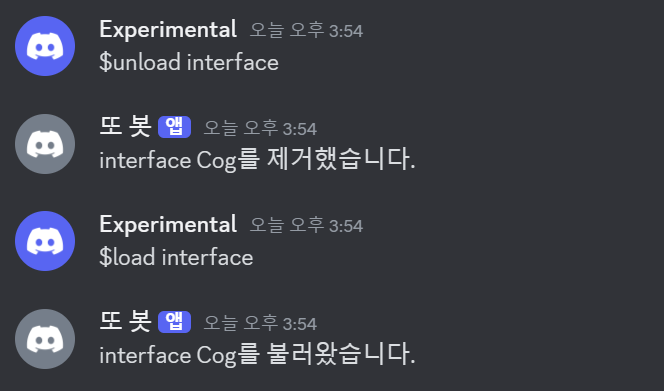
The interface extension has been unloaded and loaded again.
1
2
3
4
5
6
7
# cogs/interface.py
...
async def setup(bot):
    await bot.add_cog(Interface(bot))

async def teardown(bot):
    print("몸이 이상해요..")
Just as loading calls setup(), unloading can call the module’s optional teardown(). Use it for cleanup that must happen when the extension is removed.

The terminal shows the message from teardown() during unloading.
2. Reload a Cog’s extension
Use reload_extension() to reload an extension without issuing separate unload and load calls.
1
2
3
4
5
6
7
8
9
10
11
12
# bot.py
...
@bot.command(name='reload')
@commands.is_owner()
async def reload(ctx, extension: str):
    try:
        await bot.reload_extension(f'cogs.{extension}')
        await ctx.send(f'{extension} Cog를 다시 불러왔습니다.')
        await bot.tree.sync()
    except Exception as e:
        await ctx.send(f'오류: {e}')
...
Synchronize the command tree after changing application-command definitions.
1
2
3
4
5
6
# cogs/interface.py
    ...
    @app_commands.command(name='추가', description="새로운 명령어")
    async def new_command(self, interaction: discord.Interaction):
        await interaction.response.send_message("새로 만들어졌어요.")
    ...
I added this command to interface.py while the bot was running, then reloaded the extension.
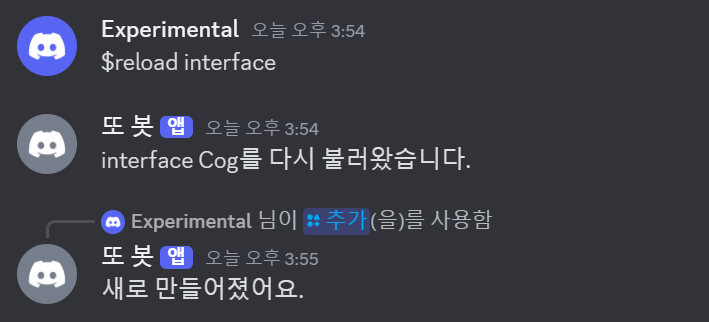
The new command is available without restarting the bot.
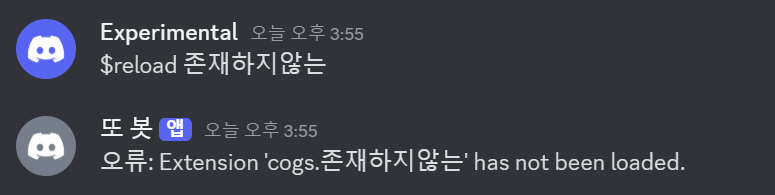
If reloading fails, the command reports the error.
3. Add a new Cog
We can also create an entirely new module while the bot runs.
1
2
3
4
5
6
7
8
9
10
11
12
13
14
15
# cogs/new.py
import discord
from discord import app_commands
from discord.ext import commands

class New(commands.Cog):
    def __init__(self, bot):
        self.bot = bot

    @app_commands.command(name='bye', description="작별인사를 합니다")
    async def bye(self, interaction: discord.Interaction):
        await interaction.response.send_message("잘가요")

async def setup(bot):
    await bot.add_cog(New(bot))
For this test, I created cogs/new.py with a New Cog.
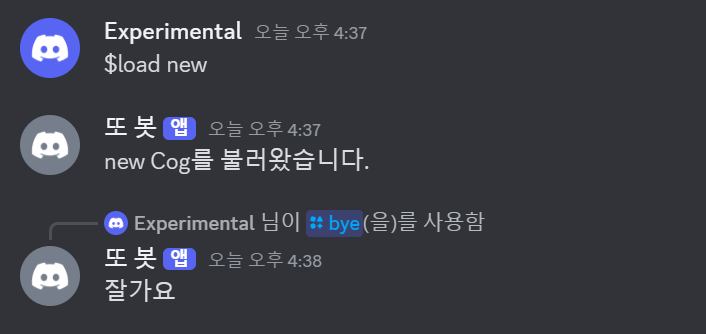
Running $load new loads its commands without restarting the bot.
The code is now modular, and the bot can keep running during development. Before adding more content, there is one more foundation to build: persistent storage with SQLite.
Appendix
i. Complete code
Show code
1
2
3
4
5
6
7
8
9
10
11
12
13
14
15
16
17
18
19
20
21
22
23
24
25
26
27
28
29
30
31
32
33
34
35
36
37
38
39
40
41
42
43
44
45
46
47
48
49
50
51
52
53
54
55
56
57
58
59
60
61
62
63
# bot.py
import os, discord
from discord import app_commands
from discord.ext import commands
from dotenv import load_dotenv
from cogs.interface import SelectView

load_dotenv()
TOKEN = os.getenv('BOT_TOKEN')
GUILD = int(os.getenv('GUILD_ID'))
CHANNEL = int(os.getenv('CHANNEL_ID'))
ADMIN = int(os.getenv('ADMIN_ID'))
welcome_channel = {GUILD:CHANNEL} # 길드별 환영 메시지 전송 채널

intents = discord.Intents.all()

bot = commands.Bot(command_prefix='$', intents=intents)

async def load_extensions():
    for filename in os.listdir('cogs'):
        if filename.endswith('.py'):
            extension = 'cogs.' + filename[:-3]
            print(f"{extension} 모듈을 불러왔습니다.")
            await bot.load_extension(extension)

@bot.event
async def on_ready():
    bot.add_view(SelectView())
    guild = discord.utils.find(lambda g: g.id == GUILD, bot.guilds)
    print(
        f"{bot.user}(으)로 접속했습니다.\n"
        f"접속 길드: {guild.name} (ID: {guild.id})"
    )

@bot.event
async def setup_hook():
    await load_extensions()
    await bot.tree.sync() # tree 동기화

@bot.tree.command(name='곱하기', description="숫자 두 개를 곱합니다")
@app_commands.describe(정수1="첫 번째 정수", 정수2="두 번째 정수")
async def multiply(interaction: discord.Interaction, 정수1: int, 정수2: int):
    product = 정수1 * 정수2
    await interaction.response.send_message(f"결과는 {product}입니다.")

@bot.tree.command(name='참가일', description="멤버의 서버 참가 날짜를 알려줍니다")
@app_commands.describe(member="조회할 멤버")
async def joined(interaction: discord.Interaction, member: discord.Member):
    join_date = member.joined_at.strftime("%Y-%m-%d")
    await interaction.response.send_message(f"{member.display_name}님은 {join_date}에 서버에 참가했습니다.")

@bot.tree.context_menu(name="참가일")
async def joined_user_menu(interaction: discord.Interaction, member: discord.Member):
    join_date = member.joined_at.strftime("%Y-%m-%d")
    await interaction.response.send_message(f"{member.display_name}님은 {join_date}에 서버에 참가했습니다.")

@bot.tree.context_menu(name="글자수")
async def character_count(interaction: discord.Interaction, message: discord.Message):
    characters = len(message.content)
    characters_no_space = len(message.content.replace(' ', ''))
    await interaction.response.send_message(f"공백 포함 {characters}자, 공백 제외 {characters_no_space}자")

bot.run(TOKEN)
1
2
3
4
5
6
7
8
9
10
11
12
13
14
15
16
17
18
19
20
21
22
23
24
25
26
27
28
29
30
31
32
33
34
35
36
37
38
39
40
41
42
43
44
45
46
47
48
49
50
51
52
53
54
55
56
57
58
59
60
61
62
63
64
65
66
67
68
69
70
71
72
73
74
75
76
77
78
79
80
81
82
83
84
85
86
87
88
89
90
91
92
93
94
95
96
97
98
99
100
101
102
103
104
105
106
# cogs/interface.py
import discord
from discord import app_commands
from discord.ext import commands

class ButtonView(discord.ui.View):
    def __init__(self, timeout):
        super().__init__(timeout=timeout)
        self.message = None
        self.button_pressed = False

    async def on_timeout(self):
        if not self.button_pressed:
            for child in self.children:
                if isinstance(child, discord.ui.Button):
                    child.disabled = True
                    child.label = "실패!"
                    child.style = discord.ButtonStyle.danger
        await self.message.edit(view=self)

    @discord.ui.button(label="10초 안에 누르세요!", style=discord.ButtonStyle.primary)
    async def button_response(self, interaction: discord.Interaction, button: discord.ui.Button):
        self.button_pressed = True
        button.disabled = True
        button.label = "성공!"
        button.style = discord.ButtonStyle.success
        await interaction.response.edit_message(view=self)

class SelectView(discord.ui.View):
    def __init__(self):
        super().__init__(timeout=None)
        self.message = None

    @discord.ui.select(
        custom_id='select_view',
        placeholder="국적을 선택하세요",
        min_values=1, # 골라야 할 최소 갯수
        max_values=1, # 고를 수 있는 최대 갯수
        options=[
            discord.SelectOption(
                label="대한민국",
                description="대한민국 국민입니다.",
                emoji='🇰🇷'
            ),
            discord.SelectOption(
                label="미국",
                description="미국 국민입니다.",
                emoji='🇺🇸'
            ),
            discord.SelectOption(
                label="일본",
                description="일본 국민입니다.",
                emoji='🇯🇵'
            )
        ]
    )
    async def select_response(self, interaction: discord.Interaction, select: discord.ui.Select):
        await interaction.response.edit_message(content=f"{select.values[0]} 국적을 선택하셨습니다.")

class ActionRowView(discord.ui.View):
    @discord.ui.button(label="버튼 1", row=0, style=discord.ButtonStyle.primary)
    async def first_button_callback(self, interaction, button):
        await interaction.response.send_message("간지러워요!")

    @discord.ui.button(label="버튼 2", row=0, style=discord.ButtonStyle.primary)
    async def second_button_callback(self, interaction, button):
        await interaction.response.send_message("간지러워요!")

    @discord.ui.button(label="버튼 3", row=2, style=discord.ButtonStyle.secondary)
    async def third_button_callback(self, interaction, button):
        await interaction.response.send_message("간지러워요!")

    @discord.ui.select(
        placeholder="저는 드롭다운 메뉴에요",
        row=1,
        options=[
            discord.SelectOption(label="1"),
            discord.SelectOption(label="2"),
            discord.SelectOption(label="3")
        ]
    )
    async def select_callback(self, interaction, select):
        await interaction.response.send_message(f"숫자 {select.values[0]}번을 골랐어요.")

class Interface(commands.Cog):
    def __init__(self, bot):
        self.bot = bot

    @app_commands.command(name='버튼', description="버튼 실험용 명령어")
    async def button(self, interaction: discord.Interaction):
        view = ButtonView(timeout=10.0)
        await interaction.response.send_message(view=view)
        view.message = await interaction.original_response()

    @app_commands.command(name='국적', description="국적을 선택합니다")
    async def country(self, interaction: discord.Interaction):
        view = SelectView()
        await interaction.response.send_message(view=view)

    @app_commands.command(name='액션', description="Action Row 데모를 보여줍니다")
    async def country(self, interaction: discord.Interaction):
        view = ActionRowView()
        await interaction.response.send_message(view=view)

async def setup(bot):
    await bot.add_cog(Interface(bot))
1
2
3
4
5
6
7
8
9
10
11
12
13
14
15
# cogs/new.py
import discord
from discord import app_commands
from discord.ext import commands

class New(commands.Cog):
    def __init__(self, bot):
        self.bot = bot

    @app_commands.command(name='bye', description="인사를 합니다")
    async def bye(self, interaction: discord.Interaction):
        await interaction.response.send_message("잘가요")

async def setup(bot):
    await bot.add_cog(New(bot))
1
2
3
4
5
6
7
8
9
10
11
12
13
14
15
16
17
18
19
20
21
22
23
24
25
26
27
28
29
30
31
32
33
34
35
36
37
38
39
40
41
42
# cogs/welcome.py
import discord
from discord import app_commands
from discord.ext import commands
from datetime import datetime

class Welcome(commands.Cog):
    def __init__(self, bot):
        self.bot = bot

    @commands.Cog.listener()
    async def on_member_join(self, member):
        channel = member.guild.system_channel
        if channel is not None:
            await channel.send(f"{member.display_name}님이 서버에 참가하셨습니다.")

    @app_commands.command(name='hello', description="인사를 합니다")
    async def hello(self, interaction: discord.Interaction):
        embed = discord.Embed(
            title=":raised_hands: 반갑습니다!",
            description="서버에 오신 것을 환영합니다.",
            color=discord.Color.gold(),
            timestamp=datetime.now(),
            url='https://sunwoo-j.github.io/'
        )
        embed.add_field(name="동해물과 백두산이", value="마르고 닳도록 하느님이 보우하사 우리나라 만세", inline=False)

        embed.add_field(name="무궁화 삼천리", value="화려강산", inline=True)
        embed.add_field(name="대한사람", value="대한으로", inline=True)
        embed.add_field(name="길이 보전하세", value="(간주)", inline=True)

        file = discord.File('./icon.gif')

        embed.set_author(name="디스코드 봇 DIY", icon_url='attachment://icon.gif')
        embed.set_thumbnail(url='https://picsum.photos/100/100')
        embed.set_image(url='https://picsum.photos/600/400')
        embed.set_footer(text="Footer가 들어가는 공간", icon_url='attachment://icon.gif')

        await interaction.response.send_message("안녕하세요", embed=embed, file=file)

async def setup(bot):
    await bot.add_cog(Welcome(bot))
ii. Folder structure
📦Discord Bot
 ┣ 📂cogs
 ┃ ┣ 📜interface.py
 ┃ ┣ 📜new.py
 ┃ ┗ 📜welcome.py
 ┣ 📜.env
 ┣ 📜bot.py
 ┣ 📜icon.gif
 ┗ 📜thumbnail.png
댓글